
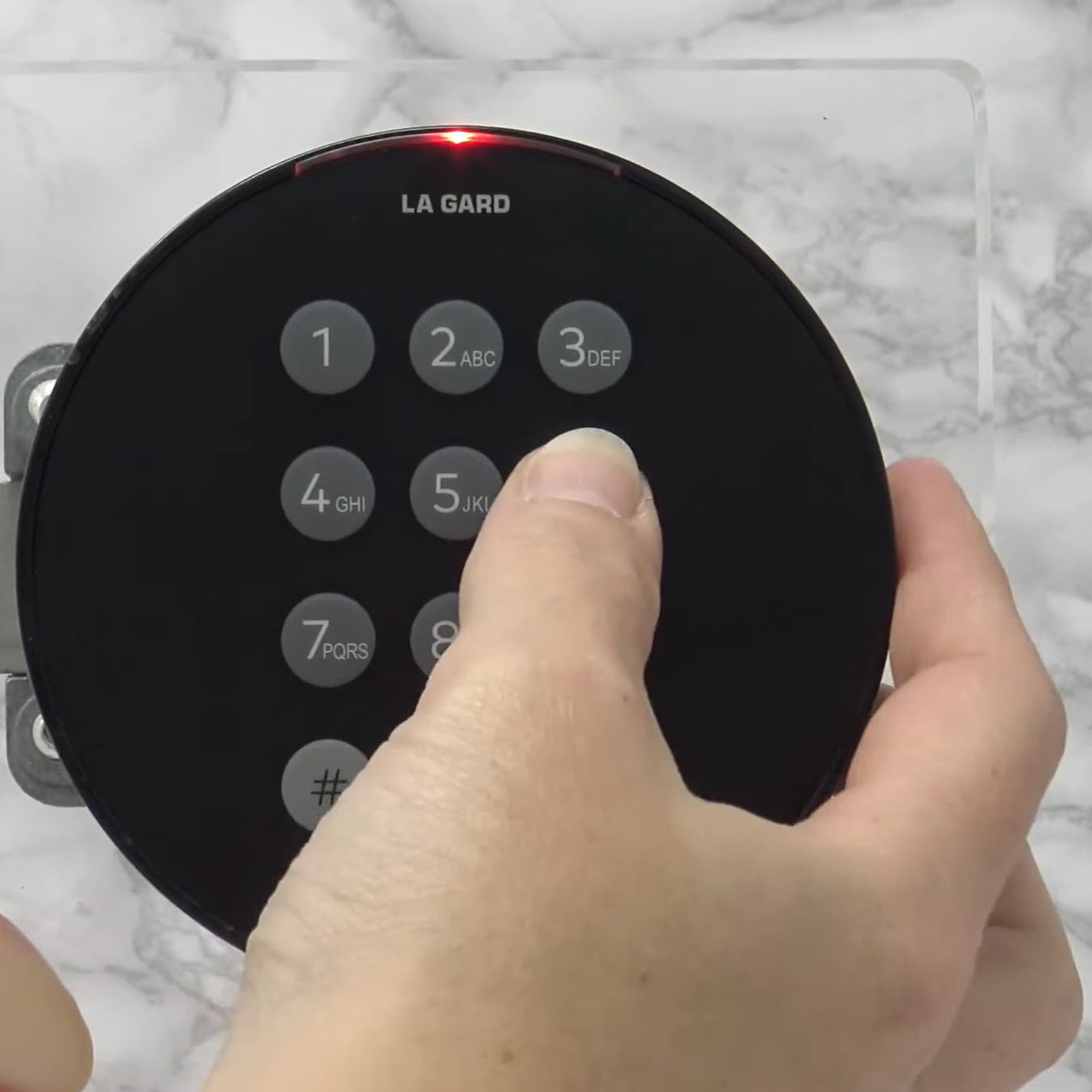
dormakaba LA GARD Basic 700 - Changing The Code
Posted by Jim Noort on 22nd Nov 2026
Changing the Code on a dormakaba LA GARD Basic 700
The Basic 700 is the digital keypad we stock on Sentinel safes. It takes a six-digit code, it holds one Manager and one User, and there are two ways to change a code — both of them done with the door open.
If your safe has a round black dormakaba keypad, this is the lock you have. Changing its code takes about a minute, but the order of the steps matters, and the one mistake that costs real money is doing it with the door shut.
This guide covers:
- How to tell a Basic 700 from the look-alike 701 to 705 keypads, which take different commands
- The factory code, and the six-digit rule
- Both code-change methods, keystroke by keystroke
- The Super Master Reset Code — the one-shot setting most owners never get told about
- Adding, disabling and deleting the second user
- What happens after four wrong codes, and what happens if you forget the code entirely
Every instruction below comes from dormakaba’s own LA GARD 700 Series guide (PDF), and the download sits at the bottom of this page.
Reviewed and published November 2026.
First: Check You Have a Basic 700
dormakaba sells two families under the LA GARD 700 name, and they look similar on the door. They are not interchangeable, and the 701 to 705 instructions you will find online will not work on a Basic 700.
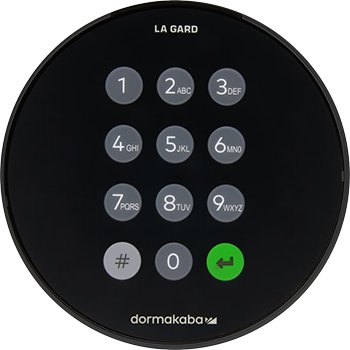
The quick test: press #. On a Basic 700 the backlight comes on and nothing else happens — the keypad does not respond to that command at all. On a 701 to 705 keypad, # is answered with a green LED.
The dormakaba LA GARD Basic 700 keypad, stocked as standard on Sentinel safes.

The 701 to 705 models use # command strings (#50, #56 and so on). The Basic 700 uses none of them. If a set of instructions starts with a # command, it is for the other family and will not change your code.
 The Basic 700 at a Glance
- Code length: six digits, fixed
- Users: one Manager and one User
- Locks per keypad: one
- Display: none — the lock talks to you in beeps and LED flashes
- Audit trail: none, and it cannot be programmed from a PC
- Time delay, dual-user mode, duress alarm: none of these on the Basic
- Power: 2 x 9-volt alkaline batteries, with an AC power option

LA GARD is dormakaba’s safe lock brand. The Basic 700 keypad and its lock body are matched — a Basic keypad will not pair with a 700 Series lock, and a 700 Series keypad will not pair with a Basic lock. Nothing in the 700 range works with legacy LA GARD hardware either.
Before You Start
 Do It With the Door Open
dormakaba’s instruction is explicit: perform the code change with the container open, and test the new code before you close the door. A code change that half-completes on a closed safe is the single most common reason we get called out to open one.
Swing the door wide, change the code, then test the new code twice with the door still open. Only then close it.
 The Factory Code
A new Basic 700 leaves the factory with the Manager combination set to 123456. That code is printed in dormakaba’s public documentation, so it is not a secret — change it before the safe holds anything.
There is a second factory code, the Super Master Reset Code, set to 55555555. It has a catch, and it is covered in its own section below.
 How the Keypad Answers You
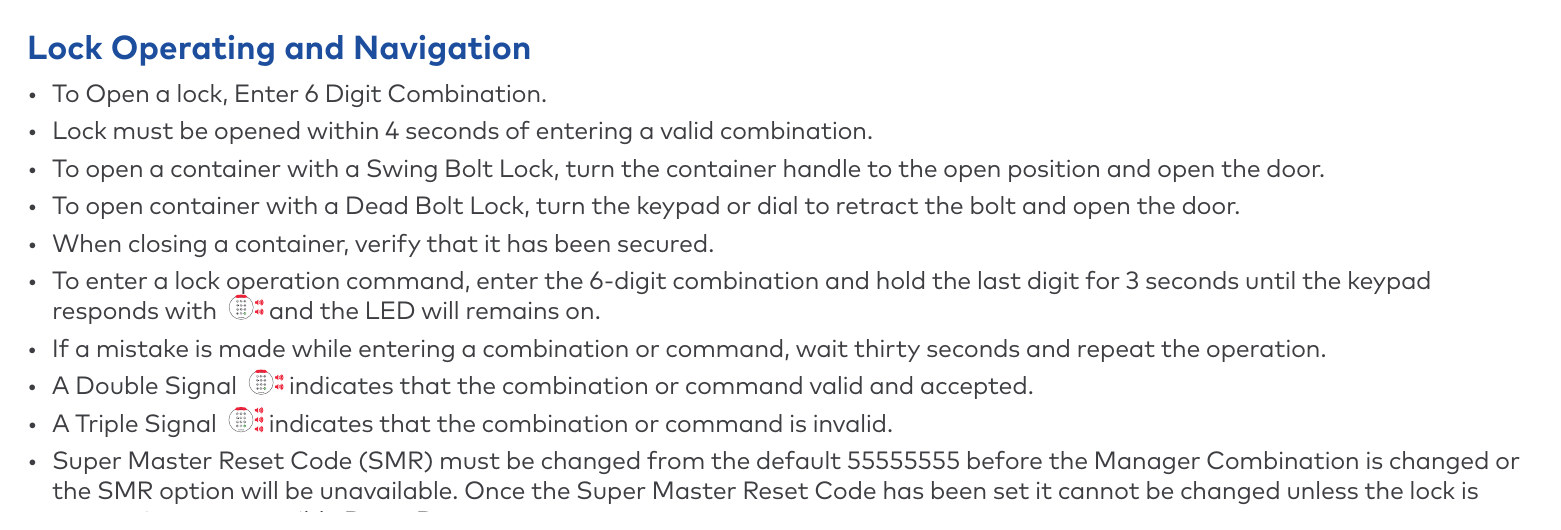
With no screen, the lock signals everything with beeps and LED flashes. Four rules carry you through every procedure on this page:
- A double signal means the entry was valid and accepted
- A triple signal means it was invalid
- To start a command, enter the six-digit code and hold the last digit for three seconds until the keypad answers and the LED stays on
- If you fumble an entry, wait thirty seconds and start the whole operation again
Changing the Code — Both Methods
dormakaba gives two methods. They produce the same result, so use whichever you can remember. Both change the code of whoever enters it: a Manager changes the Manager code, a User changes the User code.
Method 1 — Start With 000000
- Open the safe door.
- Enter 000000.
- Enter your existing six-digit code. The LED stays lit.
- Enter the new six-digit code.
- Enter the new code again.
- The LED turns off. The code is changed.
Method 2 — Hold the Last Digit, Then Press 0
- Open the safe door.
- Enter your existing six-digit code and hold the last digit for three seconds. The LED stays lit.
- Press 0.
- Enter the new six-digit code.
- Enter the new code again.
- The LED turns off. The code is changed.
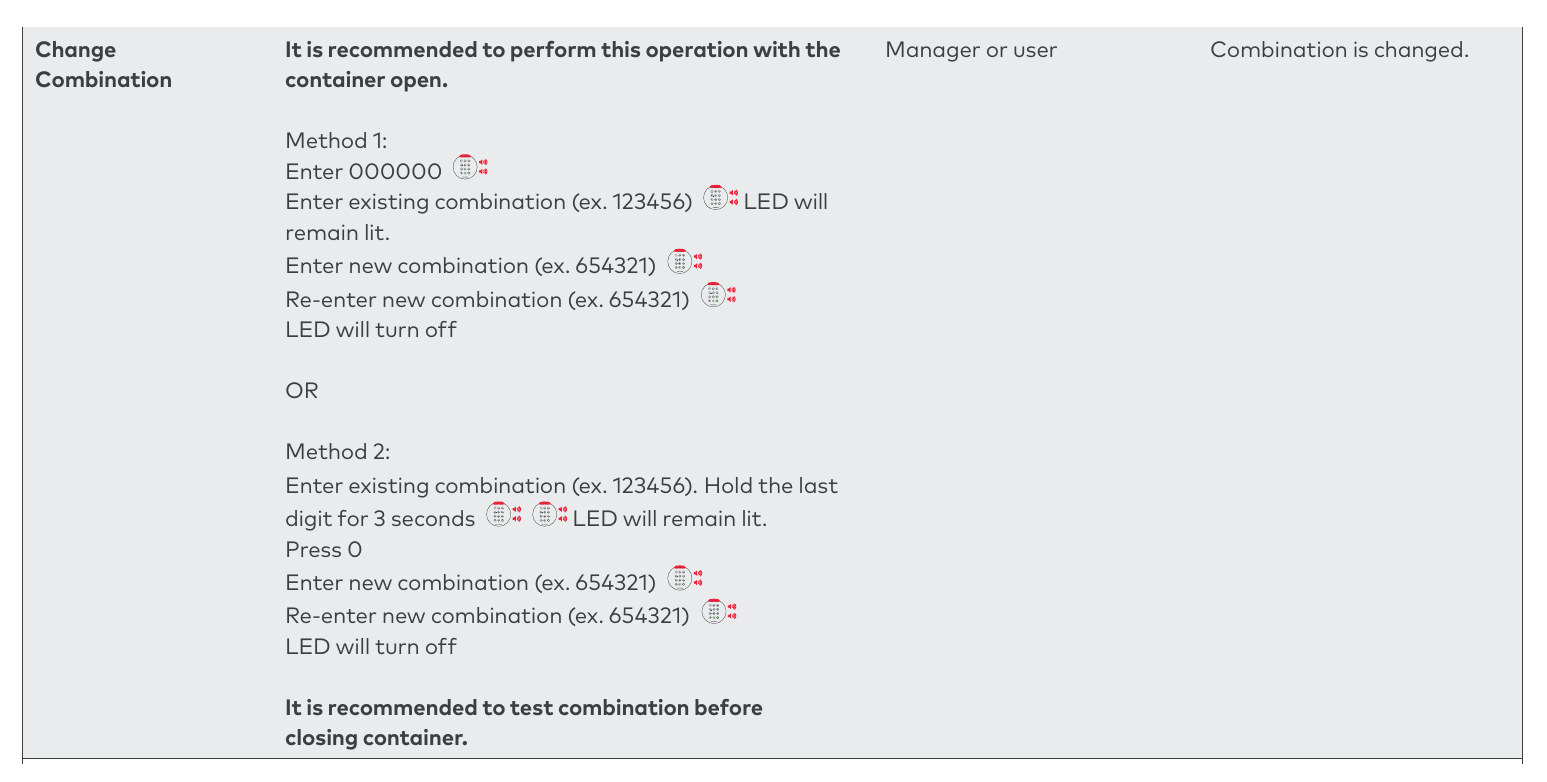

Enter the new code and confirm the bolt retracts. Then do it once more. A code that works on the second attempt as reliably as the first is a code you can trust behind a closed door.
Six digits, and avoid the obvious: birthdays, 123456, repeated digits, or the street number on the front of the building. Write it down and keep it somewhere that is not inside the safe.
Watch the Code Change
The same procedure on a real safe, start to finish.
The Second User
The Basic 700 holds two codes: a Manager and a User. Both can open the safe and both can change their own code. Only the Manager can create, suspend or remove the User.
Every one of these commands starts the same way — enter the Manager code and hold the last digit for three seconds until the LED stays on — then press a single number:
- Press 1 to enable a new User: enter the new user code, then enter it again. Press 1 on a disabled user instead and it reinstates them on their existing code.
- Press 2 to disable the User. The code is kept but stops working — useful when a staff member is away rather than gone.
- Press 3 to delete the User. The code goes with them.
In each case the LED turns off when the command completes. Test the result before closing the door.
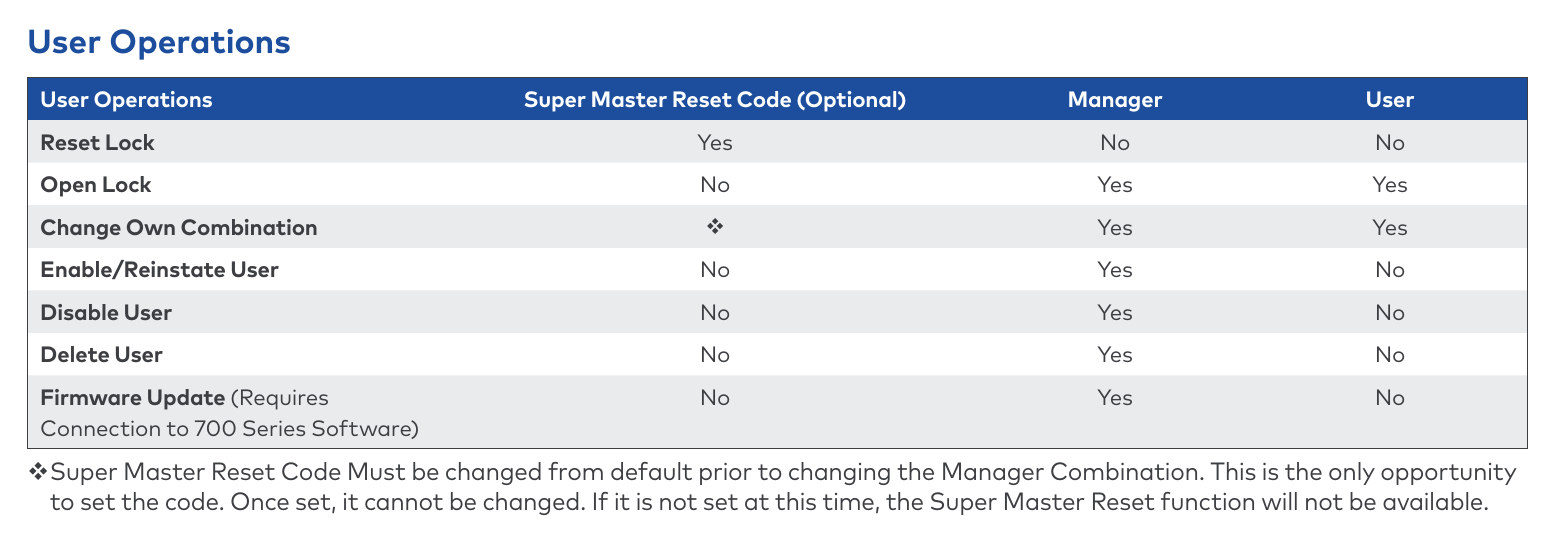

If you need more than two people with separate codes, or an audit trail of who opened the safe and when, the Basic 700 cannot do it — that is what the 701 to 705 models are for. Talk to us about an upgrade path for your safe.
The Super Master Reset Code — Set It Now or Never
This is the part of the Basic 700 that catches people out, and it is worth reading twice.
The lock ships with a Super Master Reset Code of 55555555 — eight digits, not six. It exists so that a Manager who forgets their code can reset the lock without a locksmith. But:
- It must be changed from 55555555 before you change the Manager code. That is the only opportunity you get.
- If you change the Manager code first, the Super Master Reset function is no longer available.
- Once set, it cannot be changed — not without a Reset Box.
Set the Super Master Reset Code first, then change the Manager code. Do it the other way round and you have permanently given up your own reset path.
 Setting the Super Master Reset Code
- Open the safe door.
- Press and hold 0 for three seconds.
- Enter the default code 55555555 and hold the last digit for three seconds. The LED stays lit.
- Press 0.
- Enter your new eight-digit code.
- Enter the new eight-digit code again. The LED turns off.
Using It Later
If the Manager code is lost and the Super Master Reset Code was set, press and hold 0 for three seconds, enter the Super Master Reset Code holding the last digit for three seconds, then press 8. The Manager code returns to 123456 and any User code is cleared. The Super Master Reset Code itself stays as you set it.
Four Wrong Codes: the Penalty Period
The Basic 700 does not lock you out permanently, but it does make you wait. Four consecutive invalid codes start a five-minute penalty. During it the LED flashes every ten seconds and the keypad ignores the number keys entirely.
After the five minutes, two more wrong codes start another five-minute penalty, and so on until a valid code is entered. The keypad is not broken — it is counting.

A keypad in a penalty period flashes every ten seconds and ignores number keys. A keypad with flat batteries behaves differently — see changing the batteries.
If the Code Is Lost
Where no Super Master Reset Code was set, the documented way back is a 700 Series Reset Box (dormakaba part number 704065) connected to the lock body’s BAT port. It returns the Manager code to 123456 and the Super Master Reset Code to 55555555, and it deletes any User.
A Reset Box only works on a lock you can reach. While it is connected the keypad is ignored completely, so the door must be held open for the whole procedure. On a safe that is already locked shut, the lock has to be drilled — which is a locksmith job and a repair afterwards.
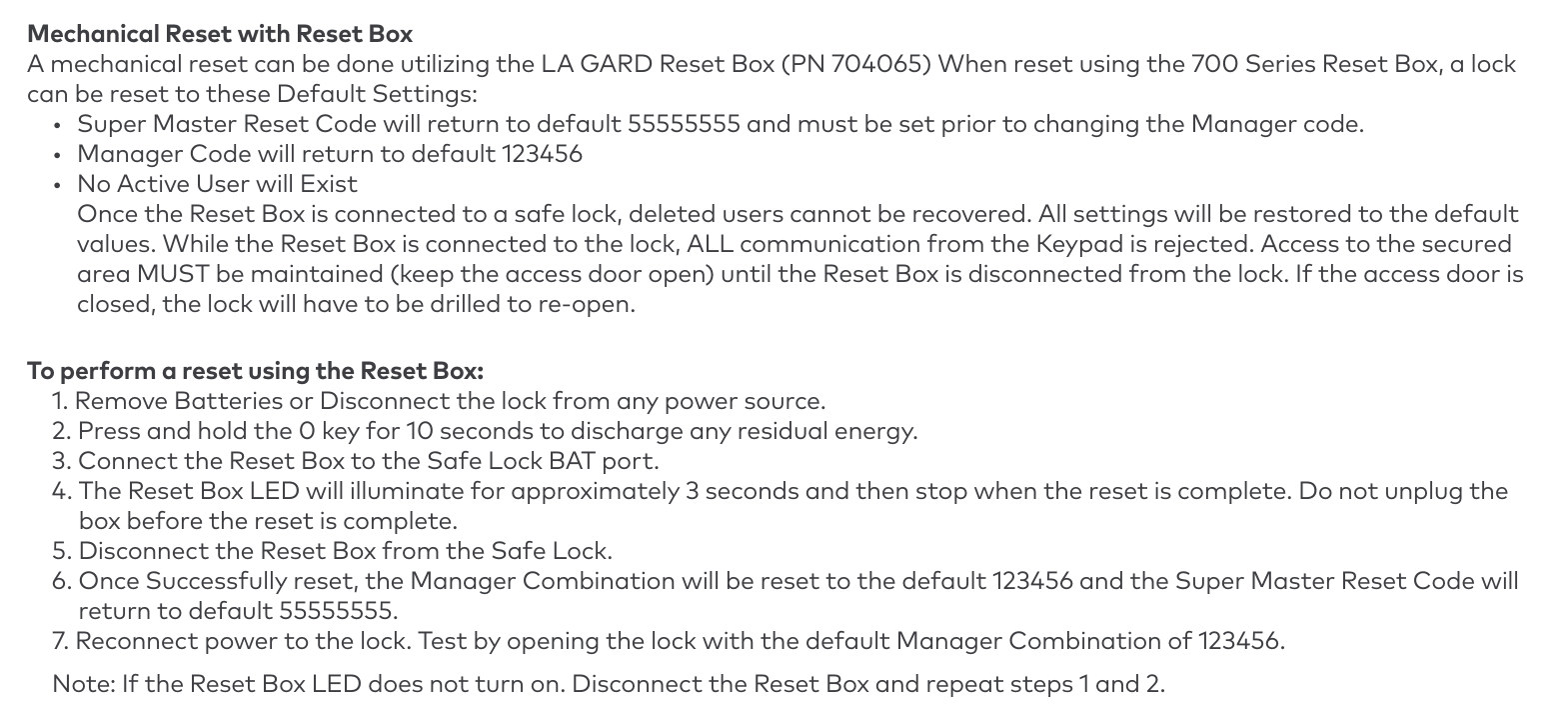
If your safe is shut and the code is gone, do not keep trying combinations — you will only stack up penalty periods. See opening a safe, or call us and we will talk through the options before anything gets drilled.
Which Safes Use This Keypad
The dormakaba LA GARD Basic 700 is the digital keypad we stock on the Sentinel Safes range. A Ross 700 key lock or a LA GARD 3390 three-wheel combination dial is a special order through Sentinel, so allow extra lead time and contact us for a price and a date.
- Sentinel Defender Series home and office safes — Defender 1, Defender 2, Defender 3 and Defender 4
- Sentinel Sniper Series gun safes — Sniper 1, Sniper 2, Sniper 3, Sniper 4 and Sniper 5
The Format DL safes use a Sargent & Greenleaf keypad, and most Dominator safes use a Tecnosicurezza Pulse 2. Neither takes the commands on this page. If you are not sure what is on your door, send us a photo.
Downloads
- LA GARD 700 Series Guide, Part 2 (PDF) — this is the one you want. The 700 Basic operating instructions, specifications and FAQs run from page 3 to page 10; the Change Combination procedure is on page 9.
- LA GARD 700 Series System User Guide, Part 1 (PDF) — the full system guide for Models 701 to 705. Useful background on the wider range, but its commands do not apply to a Basic 700.

Save the PDF to your phone, not to a folder inside the safe. The day you need it is the day you cannot open the door.
Frequently Asked Questions
 What is the factory code on a LA GARD Basic 700?
The factory Manager combination is 123456 and the factory Super Master Reset Code is 55555555. Both are published in dormakaba's own documentation, so change the Manager code before the safe holds anything of value.
How many codes can the lock hold?
Two: one Manager and one User. Both can open the safe and change their own code; only the Manager can create, disable or delete the User. The Basic 700 cannot hold more codes and keeps no audit trail.
Can I use a four-digit or eight-digit code?
No. The Manager and User codes are six digits, fixed. The Super Master Reset Code is the exception at eight digits.
I made a mistake part-way through changing the code. What now?
Wait thirty seconds, then start the whole operation again from the beginning. Do not try to carry on from where you stopped.
What happens after four wrong codes?
A five-minute penalty period starts. The keypad LED flashes every ten seconds and the number keys do nothing. After that, two more wrong codes start another five-minute penalty, and so on until a valid code is entered.
I have forgotten the code and the safe is locked. Can it be opened?
Yes, but not with the keypad. If a Super Master Reset Code was set, it resets the Manager code to 123456. If it was not, the lock needs a 700 Series Reset Box connected to the lock body - which means the door has to be open. On a closed safe the lock has to be drilled and repaired. Call Terry's Gold Coast Safes before you try anything else.
Will these steps work on a 701, 702, 703, 704 or 705 keypad?
No. Those models use # command strings and are a separate family - the Basic 700 keypad and lock are not compatible with them, or with legacy LA GARD hardware. Press # on your keypad: a Basic 700 lights the backlight and does nothing else, while a 701 to 705 answers with a green LED.
Does changing the batteries change my code?
No. Nothing in dormakaba's battery instructions asks you to re-enter or reset a code. The only documented way the lock returns to the factory 123456 is a deliberate reset.
Related Guides
The warning signals, which 9-volt batteries to use, and how a flat keypad turns into a lockout.
What we can do about a safe that will not open - lost codes, flat batteries and failed locks.
Scheduled servicing for safe locks and boltwork, and what a service covers.
The warnings that come before a lock fails - stiff handles, intermittent keypads and dragging bolts.
The secondary locking devices inside a safe, why they fire, and what it means when one does.
The Defender, Sniper, Protector and Timeless ranges, stocked with the LA GARD Basic 700 keypad.
Stuck on a Safe Lock?
Send us a photo of your keypad and we will tell you what you have and what it takes to change the code.
Ask an ExpertTerry’s Gold Coast Safes
2 Prosper Crescent
Burleigh Heads, QLD 4220
Showroom display stock, free pickup, and a locksmith on hand for safe lock work.